Luminance simulation - Albedo/horizon settings

Sophisticated 3D simulation of light levels using advanced ray-tracing techniques, covering luminance, illuminance, daylight factors, perceived impact, photorealistic visualisation
Post Reply
Knaken
VE Newbie
VE Newbie
Posts: 6
Joined: Thu May 06, 2010 1:35 pm

Luminance simulation - Albedo/horizon settings

Post by Knaken »

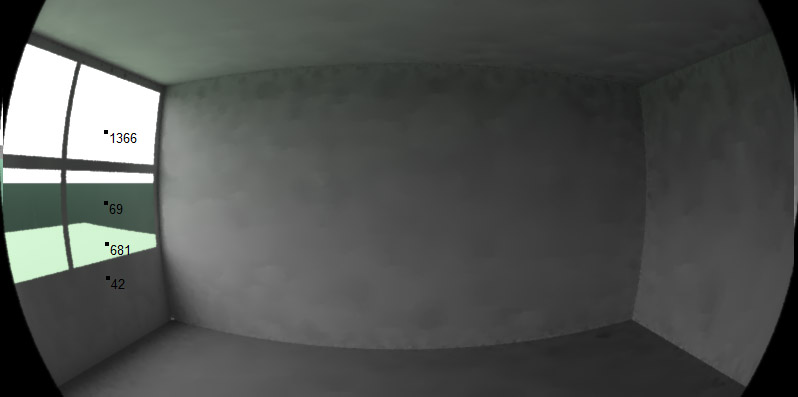
Hello. I'm having a problem with simulating illuminance/luminance. The IESRadiance software simulates the outside surface below the horizon, but it seems to be way too dark.

Image

The horizon is almost as dark as the inside of the window frame.
To make a comparison, I added a rectangular surface at ground level outside the window. It has a green reflectance of 0.25 to simulate grass.
Walls have 0.65, Ceiling has 0.9 and floor has 0.25.
Sky is CIE overcast

How can I change the settings of the albedo/horizon so that it reflects light better?
User avatar
PCully
Site Admin
Site Admin
Posts: 1465
Joined: Tue Sep 09, 2008 9:52 am

Re: Luminance simulation - Albedo/horizon settings

Post by PCully »

Hi,

If you want to control the reflection from the ground plane you could draw a base on the model and apply the surface properties to this. e.g. draw a prism 1 metre thick from z = -1 to 0 (assuming your model starts at zero height).

Hope this helps you get the analysis you are looking for,

Phil
IES Worldwide Technical Support
Knaken
VE Newbie
VE Newbie
Posts: 6
Joined: Thu May 06, 2010 1:35 pm

Re: Luminance simulation - Albedo/horizon settings

Post by Knaken »

Yes, that is what i did in the picture above (Notice the green plane outside). Sadly, it looks unnatural having a dark horizon directly above it. For presentation reasons, it might raise confusion in the audience.

Can I conclude that it's not possible to change the settings for the horizon background?
Post Reply